✦ For parents & caregivers

More ways for your child to show what they know.

When a learner communicates differently, it can be hard to tell what is understood, what needs support and what to practise next. Sage’s World turns real goals into short, confidence-building activities—and gives you clearer signals to act on.

  • Start with one real goal
  • Use familiar words, photos and routines
  • Share a clearer update
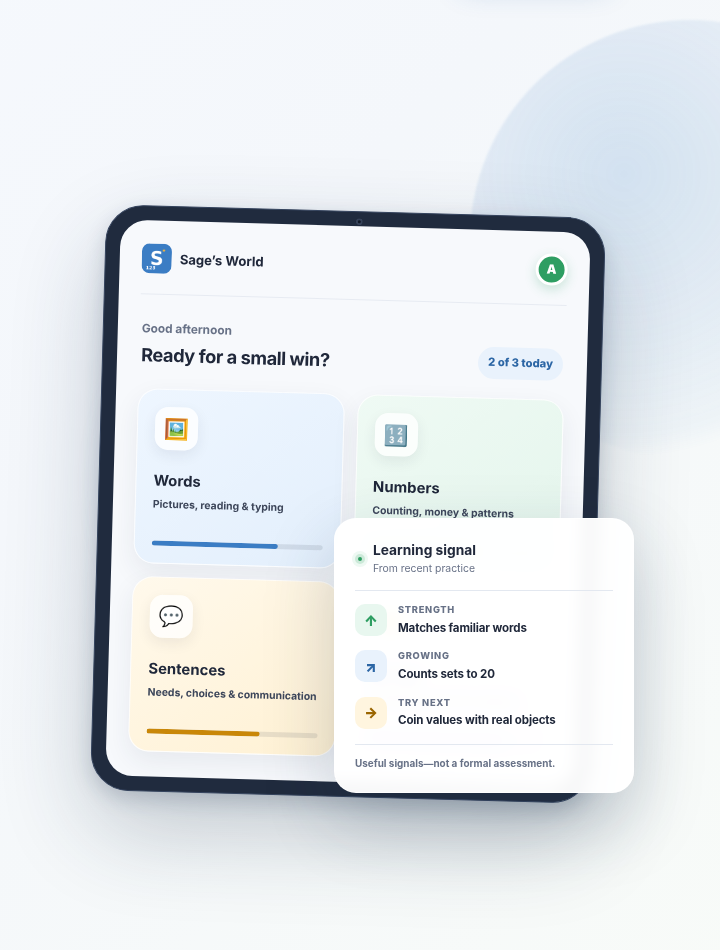
Sage’s World learning app dashboard with personalized Words, Numbers and Sentences activities.

The value for families

You already know your child. The app helps you see the learning.

Sage’s World does not replace your instincts or your child’s support team. It gives you another way to notice what is clicking, where support is helping and which small next step may be worth trying.

What gets easier

Less guessing. More useful moments.

Bring school goals into everyday life without turning home into another classroom.

Turn a goal into something your child can do

Choose a real learning target and practise it through pictures, listening, tapping, typing or speech-supported activities.

Make practice feel familiar

Use words, people, routines, photos and stories that already matter in your child’s world.

See patterns—not just a score

Notice what came easily, where help was needed and which items are becoming more consistent.

Share a clearer update

Copy a plain-language summary for a teacher, therapist or support-team conversation.

A simple routine

Start small. Keep the purpose clear.

A useful session can begin with one goal, one short round and one thing to notice.

  1. Choose one real goal

    Start with something useful now: matching familiar words, counting objects, asking for help or following a daily routine.

  2. Make it personal

    Add familiar language, photos or routines so the activity asks about a world your child already recognizes.

  3. Use the signal

    Review what happened, then choose one small real-life activity or one clear update to share with the team.

After a short round

Take away something you can actually use.

The progress view translates recent practice into plain language: what looks strong, what is still growing and one practical idea for what to try next.

Practice-based observations. Not a formal assessment, diagnosis or grade level.

Doing well

Skills and items that are becoming more consistent.

Working on

Specific places where more practice or support may help.

Try this next

A short home activity connected to the pattern—not a generic worksheet.

Illustrative Sage’s World progress summary with Doing well, Working on and Try this next learning signals.
Doing well 💪 Matches familiar objects to words and completes the morning schedule independently. Working on 🎯 Choosing between Canadian coin values and asking for help in a new situation. Try this next 🏠 Sort three real coins together. Name each one, then ask, “Which one buys more?”

Built for the child in front of you

Confidence is part of access.

The way an activity responds can determine whether a learner stays engaged long enough to show what they understand.

Every question ends in success

Wrong choices fade, support appears gently and the learner reaches a correct finish.

More than one way to participate

Pictures, listening, tapping, typing and speech-supported activities create more paths to respond.

Difficulty grows gradually

Levels can adapt with the learner, while an adult can still set the pace and priorities.

Short rounds fit real life

Practise without requiring a long session, a perfect mood or a classroom setup.

Core activities can work offline

After the first visit, core learning remains available when a connection is unreliable.

The adult stays in control

Goals, settings, photos and shared information remain reviewable. An adult decides whether to use optional AI. IEP suggestions remain drafts until approval, and the parent helper can answer questions but cannot change settings.

Home and school, connected

Bring a clearer picture to the conversation.

Instead of saying only “we practised math,” you can share the exact skill, the response pattern, the support that helped and what may be worth trying next.

“Here is what we noticed—and the small next step that seemed to help.”

A more useful starting point for a teacher, therapist or support-team discussion.

Share with the team

Plain-language update

Practised this week

Recognizing coin values

Useful next step

Repeat with the same three coins, then use them during a small pretend purchase.

Questions parents ask

Clear answers before you begin.

Start with one learner, one profile and one real goal. The app is a practice tool—not a replacement for the people who know your child.

Is Sage’s World a formal assessment?

No. It can help you notice learning patterns and ask better questions, but it does not diagnose, assign a grade level or replace professional assessment.

Do we have to use AI?

No. Goals can be entered manually and core activities work without AI. The optional IEP reader sends selected pages to Google Gemini. Each optional parent-help request sends the question, recent chat context, the learner’s first name and a summary of practice results. Google does not use this content to train its AI or have people review it. Sage’s World does not save the original IEP pages or retain the parent-help conversation; approved setup choices become part of the saved profile.

Can a teacher use the same information?

With family permission, an educator can work from the same child profile on an appropriate device or use a progress summary shared by the family.

Will it work without internet?

After the app has loaded once, core activities are designed to work offline. Account sync, online photos and optional AI features need a connection.

A clearer picture can start small

Begin with one goal. Notice one more thing they know.

Open Sage’s World for a short round, then use what you notice in the next everyday moment or team conversation.